What Is AI Automation? A Complete Guide to How It Works, Benefits, and Real-World Uses
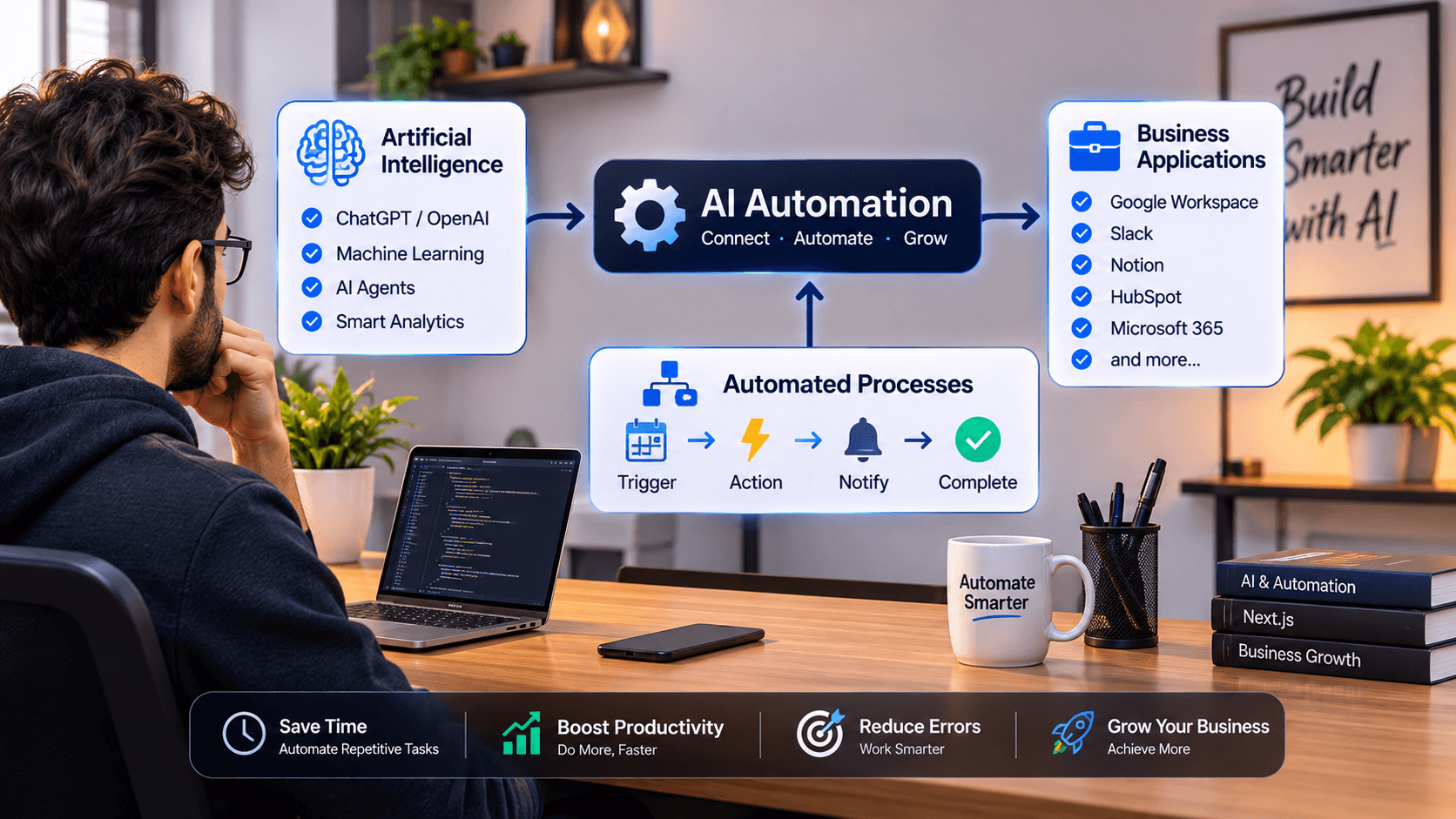
Artificial intelligence is changing the way people work, businesses operate, and everyday tasks are completed. From answering customer questions to analyzing large amounts of data, AI is making processes faster, smarter, and more efficient.
One of the most important developments in this transformation is AI automation.
Businesses no longer need to rely entirely on manual work or traditional automation systems to complete repetitive tasks. With AI-powered technologies, organizations can automate complex workflows, understand information, make predictions, and even perform tasks that previously required human judgment.
But what exactly is AI automation? How does it work? What are its real-world applications, and how can individuals and businesses benefit from it?
In this comprehensive guide, we will explore everything you need to know about AI automation, including its technologies, practical examples, popular tools, benefits, challenges, and future opportunities.
What Is AI Automation?
AI automation is the use of artificial intelligence technologies to perform tasks, make decisions, analyze information, and manage workflows with minimal human intervention.
It combines traditional automation with AI capabilities such as machine learning, natural language processing, computer vision, and generative AI.
Traditional automation follows predefined instructions. For example, a system might automatically send an email whenever someone submits a contact form.
AI automation goes further. It can understand the content of that message, identify the customer's intent, categorize the request, generate an appropriate response, and send the information to the correct department.
In simple terms, traditional automation follows instructions, while AI automation can interpret information and adapt its actions based on context.
The main goal of AI automation is not necessarily to eliminate human involvement. Instead, it helps people spend less time on repetitive activities and more time on creative, strategic, and valuable work.
How Does AI Automation Work?
AI automation works by combining intelligent technologies with automated workflows. These systems receive information, process it, determine what action should happen next, and execute that action through connected applications or services.
Although the technical implementation varies, most AI automation workflows follow a similar process.
1. Data Collection
The process begins when an automation system receives information from a source.
This information might come from:
- Website forms and customer inquiries.
- Emails and business messages.
- Databases and spreadsheets.
- E-commerce orders.
- Customer relationship management (CRM) systems.
- Documents, images, and uploaded files.
- Third-party applications and APIs.
For example, when a customer submits a support request, the automation system receives the message and prepares it for processing.
2. AI Processing and Understanding
After collecting information, the AI model analyzes the input to understand its meaning, context, or purpose.
Depending on the task, it might use natural language processing, machine learning, computer vision, or a large language model.
For example, an AI system can analyze a customer message and identify whether the person needs technical support, billing assistance, or information about an order.
3. Decision Making
Once the information has been analyzed, the system determines what action should be taken.
This can involve predefined business rules, AI-generated recommendations, classification models, or conditional workflows.
For instance:
- Billing questions are sent to the finance department.
- Technical issues are assigned to technical support.
- Refund requests are forwarded for approval.
- General questions receive an automated response.
Some decisions can be handled automatically, while sensitive or high-impact decisions should require human approval.
4. Automated Action
After determining the appropriate action, the system executes it through connected applications.
These actions may include:
- Sending emails or notifications.
- Updating customer records.
- Creating tasks in project management tools.
- Generating reports.
- Updating inventory information.
- Processing approved requests.
- Sending information to another application.
5. Monitoring and Improvement
AI automation systems can monitor workflow performance and collect feedback.
Businesses can use this information to identify errors, improve instructions, adjust automation rules, and make their workflows more reliable.
For example, if an AI assistant frequently categorizes certain customer requests incorrectly, administrators can improve its instructions or provide better training examples.
AI Automation vs Traditional Automation
Although both technologies help reduce manual work, they operate differently.
Traditional automation is generally based on predefined rules, while AI automation can interpret unstructured information and handle tasks that require some level of intelligence.
Here is a comparison:
| FeatureTraditional AutomationAI Automation | ||
| Working method | Fixed rules | AI models and workflows |
| Decision-making | Predefined conditions | Context-based analysis |
| Data handling | Mostly structured data | Structured and unstructured data |
| Adaptability | Limited | More flexible |
| Language understanding | Usually limited | Can understand natural language |
| Complexity | Best for predictable tasks | Can handle more complex tasks |
| Human involvement | Depends on workflow | Depends on risk and complexity |
For example, a traditional system can automatically send a confirmation email after receiving an order.
An AI-powered system can additionally understand customer messages, identify special delivery instructions, detect potential problems, and route unusual orders for review.
However, AI automation is not always the better choice. Simple, predictable tasks are often cheaper and more reliable with traditional rule-based automation.
The best approach is to use the technology that fits the task.
Types of AI Automation
AI automation is not a single technology. It includes several approaches that help businesses automate different types of work.
1. Robotic Process Automation (RPA)
Robotic Process Automation uses software bots to perform repetitive digital activities, such as copying information, filling out forms, moving files, and updating records.
When combined with AI, RPA can handle more complex tasks involving documents, text, and information classification.
For example, a business can use an intelligent document processing system to extract invoice details and transfer them into accounting software.
2. Intelligent Process Automation (IPA)
Intelligent Process Automation combines traditional workflow automation, RPA, and artificial intelligence.
It helps businesses automate processes that involve multiple steps, applications, and decision points.
Common applications include invoice processing, insurance claims, employee onboarding, and customer service operations.
3. AI-Powered Chatbots
AI chatbots use natural language processing and large language models to communicate with users.
Unlike basic chatbots that depend on predefined questions and answers, modern AI chatbots can understand different ways of asking the same question and generate context-aware responses.
Businesses use them for customer support, product recommendations, appointment booking, and answering frequently asked questions.
4. Machine Learning Automation
Machine learning allows computer systems to identify patterns in data and make predictions based on previous information.
It can automate activities such as:
- Fraud detection.
- Customer behavior analysis.
- Sales forecasting.
- Product recommendations.
- Predictive maintenance.
- Risk identification.
For example, an e-commerce platform can analyze customer activity and recommend products that are more relevant to individual shoppers.
5. Generative AI Automation
Generative AI uses models that can create new content, including text, images, code, audio, and other outputs.
When integrated into automated workflows, generative AI can help businesses:
- Generate marketing content.
- Summarize documents.
- Draft professional emails.
- Create product descriptions.
- Generate programming code.
- Prepare reports.
- Analyze customer feedback.
Tools powered by models such as ChatGPT, Gemini, and Claude are commonly used in these workflows.
6. AI Agents and Agentic Automation
AI agents are systems that can pursue a defined goal by interpreting information, selecting tools, and taking multiple actions.
For example, an AI research agent might search for relevant information, summarize findings, organize them into a report, and notify a team member when the report is ready.
Agentic automation can be useful for complex workflows, but it requires appropriate permissions, monitoring, and safeguards because AI agents may make incorrect decisions or take unintended actions.
Real-World Examples of AI Automation
AI automation is already being used across different industries. Here are some practical examples of how organizations can apply it.
1. Customer Support Automation
Customer support teams receive hundreds or thousands of messages every day.
AI automation can help classify incoming messages, answer common questions, retrieve relevant information, and route complicated requests to human representatives.
For example, an online store can use an AI assistant to answer questions about shipping, order status, return policies, and product availability.
If a customer has a complicated complaint, the system can transfer the conversation to a human support agent with the relevant context.
2. E-commerce Automation
Online stores can use AI automation to improve different parts of their operations.
Common examples include:
- Generating product descriptions.
- Categorizing products automatically.
- Recommending relevant products.
- Analyzing customer reviews.
- Identifying unusual order patterns.
- Automating customer support.
- Sending personalized marketing emails.
For example, when a new product is added to an online store, an AI workflow can analyze its specifications, generate a draft description, suggest relevant categories, and prepare SEO metadata for review.
3. Marketing Automation
Marketing teams can use AI automation to manage repetitive marketing activities and analyze campaign performance.
Some common applications include:
- Generating social media content.
- Preparing email campaigns.
- Segmenting customers.
- Analyzing campaign results.
- Identifying potential audiences.
- Creating content ideas.
- Scheduling approved posts.
For example, a business can connect its content management system with an AI model to generate social media captions whenever a new blog article is published.
Human review is still important to maintain accuracy, originality, and brand consistency.
4. Sales Automation
AI automation can help sales teams identify potential customers, organize leads, and manage follow-ups.
An automated workflow can collect information from website inquiries, identify the type of service a customer needs, assign a lead score, and update the CRM.
Sales representatives can then focus on high-priority opportunities instead of manually organizing every inquiry.
5. Healthcare Administration
Healthcare organizations can use AI automation for administrative activities such as document classification, appointment reminders, medical transcription, and organizing patient-related information.
For example, an automated system can convert appointment requests into structured records and send reminders to patients.
However, healthcare automation requires strong privacy protections, regulatory compliance, and professional oversight. AI-generated medical information should never replace qualified clinical judgment.
6. Finance and Accounting
Financial teams can use AI automation to process invoices, organize transactions, detect unusual patterns, and prepare financial summaries.
For example, an invoice processing workflow can extract the supplier name, invoice number, date, and total amount from an uploaded document.
The extracted information can then be transferred to accounting software after the required validation and approval.
7. Human Resources
HR departments manage repetitive activities involving recruitment, onboarding, employee records, and internal communication.
AI automation can help with:
- Organizing job applications.
- Scheduling interviews.
- Preparing onboarding documents.
- Answering common employee questions.
- Sending reminders.
- Managing routine HR workflows.
High-impact employment decisions, including hiring and candidate rejection, should involve appropriate human review rather than relying entirely on automated AI judgments.
Popular AI Automation Tools
There are many tools available for creating AI-powered workflows. Some focus on connecting applications, while others provide AI models, workflow orchestration, or specialized automation features.
Here are some widely used options.
1. n8n
n8n is a workflow automation platform that allows users to connect applications, APIs, databases, and AI services.
It provides visual workflow building, conditional logic, integrations, and support for AI-powered workflows.
It is particularly useful for developers and businesses that want greater control over their automation systems.
2. Zapier
Zapier is a popular automation platform that connects thousands of applications through automated workflows called Zaps.
Users can create workflows without extensive programming knowledge.
For example, a business can automatically send new website leads to a CRM and notify its sales team.
3. Make
Make provides a visual environment for designing automated workflows.
It supports integrations, conditional logic, data transformation, and multi-step automation scenarios.
It is useful for connecting different applications and building complex workflows.
4. OpenAI and ChatGPT
OpenAI provides AI models and services that developers can integrate into their applications and automation systems.
Businesses can use these capabilities for content generation, document analysis, customer support, information extraction, and intelligent workflows.
ChatGPT can also assist individuals with everyday productivity tasks.
5. Google Gemini
Google Gemini provides AI capabilities for understanding and generating content, analyzing information, and assisting with different tasks.
Developers can integrate Gemini models into applications and automated workflows through supported APIs.
6. Claude
Claude is an AI assistant and model family developed by Anthropic.
It can be used for writing, document analysis, coding assistance, summarization, and other language-based tasks.
Developers can integrate supported Claude models into custom applications and workflows.
7. Microsoft Power Automate
Microsoft Power Automate helps businesses automate processes across Microsoft products and other connected services.
It supports workflow automation, approvals, notifications, and integration with business applications.
The right tool depends on your technical experience, budget, workflow complexity, privacy requirements, and the applications you need to connect.
Benefits of AI Automation
AI automation offers several advantages for individuals, startups, and established organizations.
1. Increased Productivity
Employees spend less time completing repetitive activities and can focus on more valuable responsibilities.
Automating routine work can also help teams handle larger workloads without increasing manual effort at the same rate.
2. Reduced Operational Costs
Businesses can reduce some expenses associated with repetitive manual processes.
For example, automatically organizing support tickets can reduce the time employees spend sorting and assigning customer requests.
However, automation also has implementation, maintenance, infrastructure, and AI usage costs that should be considered.
3. Faster Task Completion
Automated systems can process information and execute workflows much faster than manual processes in many situations.
This is particularly useful for businesses handling large numbers of customer inquiries, documents, or transactions.
4. Improved Accuracy and Consistency
Well-designed automation can reduce errors caused by repetitive manual data entry and inconsistent procedures.
AI can also help identify missing information and unusual patterns.
However, AI models can generate incorrect results, so validation and human review remain important.
5. Better Customer Experience
Businesses can use AI-powered systems to provide faster responses, personalized recommendations, and more convenient customer interactions.
For example, an AI assistant can help customers find relevant products without waiting for a support representative.
6. Scalability
Automated workflows can help organizations handle increasing workloads.
A business can process more inquiries, documents, and routine requests without requiring every additional task to be completed manually.
7. Data-Driven Decisions
AI systems can analyze large amounts of information and identify patterns that may be difficult to notice manually.
Businesses can use these insights to understand customer behavior, monitor performance, and improve operational strategies.
Challenges and Risks of AI Automation
Despite its benefits, AI automation also introduces challenges that organizations must understand before implementing it.
1. Data Privacy and Security
AI automation systems may process sensitive customer, employee, or business information.
Organizations must ensure that information is collected, stored, processed, and shared securely.
Access controls, encryption, data retention policies, and appropriate vendor agreements are important considerations.
2. Incorrect AI Outputs
AI models can sometimes produce inaccurate information, misunderstand instructions, or generate misleading responses.
This is particularly important when automation involves financial transactions, legal information, healthcare, or important business decisions.
Organizations should introduce validation steps and human approval where necessary.
3. Implementation Costs
Although many automation platforms offer free plans or affordable starting options, advanced workflows may require paid subscriptions, API usage, hosting, and development resources.
Businesses should calculate the total cost of ownership before choosing an automation solution.
4. Integration Complexity
Different applications may use different APIs, data formats, authentication methods, and business rules.
Connecting these systems can require technical knowledge and ongoing maintenance.
5. Overdependence on Automation
Automating every process without considering its risks can create unnecessary problems.
Some activities require human judgment, empathy, creativity, and accountability.
The best approach is to automate suitable tasks while keeping humans involved where their expertise is necessary.
6. Maintenance and Monitoring
Automation workflows are not always permanent solutions.
APIs change, applications update, credentials expire, and business requirements evolve.
Regular monitoring and maintenance are necessary to keep automated systems reliable.
How to Get Started With AI Automation
You do not need to build a complicated AI system to start benefiting from automation.
A practical approach is to begin with one repetitive task and gradually expand your workflows.
Follow these steps.
Step 1: Identify Repetitive Tasks
Look for activities that consume significant time but follow a relatively predictable process.
Examples include:
- Organizing incoming emails.
- Creating reports.
- Managing customer inquiries.
- Updating spreadsheets.
- Generating product descriptions.
- Sending appointment reminders.
Start with a task that has clear inputs and measurable results.
Step 2: Choose the Right Automation Tool
Select a tool based on your requirements and technical experience.
For beginners, platforms such as Zapier and Make provide visual workflow builders.
For developers and technical teams, n8n offers flexible workflow customization and integration capabilities.
If your workflow requires language understanding or content generation, consider integrating an AI model through an appropriate API.
Step 3: Design Your Workflow
Before building the automation, identify its main stages.
For example, an automated customer inquiry workflow might look like this:
- A customer submits a website contact form.
- The system receives the submitted information.
- An AI model analyzes the message.
- The system identifies the inquiry category.
- The inquiry is saved in the CRM.
- The appropriate team receives a notification.
- A response draft is generated for review.
A clear workflow makes implementation, testing, and troubleshooting easier.
Step 4: Connect Your Applications
Use supported integrations, APIs, or webhooks to connect the applications involved in your workflow.
For example, you might connect a website, an AI model, a database, and an email service.
Make sure the system has only the permissions it needs.
Step 5: Test Before Going Live
Test the workflow with different types of inputs.
Check whether the AI understands the information correctly, whether the right actions are executed, and whether errors are handled properly.
Include unusual cases, missing information, duplicate requests, and invalid inputs.
Step 6: Monitor and Improve
After launching the automation, monitor its performance.
Measure useful indicators such as:
- Time saved.
- Workflow completion rate.
- Error frequency.
- Processing costs.
- Response time.
- Customer satisfaction.
Use these results to improve the workflow over time.
AI Automation for Small Businesses and Startups
AI automation is not limited to large corporations with extensive technology budgets.
Small businesses and startups can also benefit from practical automation solutions.
For example, a small digital agency might automate several everyday operations.
Lead management: Automatically collect website inquiries, categorize potential customers, and organize leads in a CRM.
Content creation: Generate draft blog posts, social media captions, and email newsletters for editorial review.
Customer support: Use an AI assistant to answer common questions and direct complicated requests to the appropriate team member.
Reporting: Collect business information from different sources and generate regular performance summaries.
Project management: Create tasks, send reminders, and notify team members when specific project milestones are reached.
The important thing is to choose automations that solve actual business problems rather than introducing AI simply because it is available.
AI Automation vs AI Agents: What Is the Difference?
AI automation and AI agents are related concepts, but they are not exactly the same.
AI automation generally describes workflows that use artificial intelligence to complete tasks within a defined process.
AI agents are designed to pursue goals by interpreting situations, selecting actions, and using available tools to make progress.
Consider a customer support example.
An AI automation workflow might receive a customer message, classify it, generate a response, and send it for approval.
An AI agent might interpret the customer's problem, search an authorized knowledge base, check relevant order information, decide which tool to use, and prepare an appropriate resolution.
In practice, AI agents can be part of a broader AI automation system.
However, greater autonomy also means greater responsibility. Businesses should apply permission limits, monitoring, approval requirements, and clear boundaries to agentic systems.
What Is the Future of AI Automation?
AI automation is continuing to evolve as AI models become more capable and businesses discover new ways to integrate intelligent systems into their operations.
Several developments are likely to shape its future.
1. More Capable AI Agents
AI agents are becoming increasingly useful for workflows involving multiple steps, tools, and information sources.
They may help businesses manage research, customer support, software development, and administrative operations.
2. Natural Language Workflow Creation
Automation platforms are increasingly exploring ways to let users describe a task in ordinary language and generate an initial workflow.
This could make automation more accessible to people who do not have programming experience.
3. Multimodal AI Automation
Modern AI systems can work with different types of information, including text, images, audio, and video.
This creates opportunities for automated document processing, visual inspection, transcription, content analysis, and other applications.
4. Greater Personalization
Businesses can use AI to better understand customer preferences and deliver more relevant experiences.
Personalized recommendations, communication, and customer support may become increasingly integrated into automated business workflows.
5. Human-AI Collaboration
The future of automation is not necessarily about removing humans from every process.
Instead, businesses will increasingly combine AI capabilities with human expertise.
AI can handle information processing and repetitive activities, while people focus on judgment, creativity, relationship building, and accountability.
Frequently Asked Questions About AI Automation
What is AI automation in simple words?
AI automation means using artificial intelligence to perform tasks, understand information, make decisions, and execute workflows with less manual effort. It combines AI technologies with automation tools to make processes more intelligent and efficient.
Is AI automation the same as artificial intelligence?
No. Artificial intelligence is a broader field of technology that enables computer systems to perform tasks associated with human intelligence. AI automation uses those capabilities to automate practical tasks and workflows.
Do I need coding skills to use AI automation?
No. Many platforms, including Zapier and Make, allow users to create workflows through visual interfaces. However, programming knowledge is useful for building custom integrations, advanced logic, and more complex automation systems.
Which AI automation tool is best for beginners?
Zapier and Make are popular starting points because they provide visual workflow builders and integrations with many applications. The best option depends on your workflow, budget, and technical requirements.
Can AI automation replace human employees?
AI automation can reduce the need for manual work in certain activities, but it does not eliminate the need for human expertise. Many tasks still require creativity, communication, critical thinking, ethical judgment, and accountability.
Is AI automation expensive?
Not necessarily. Some tools provide free plans, and simple workflows can be created with relatively low costs. More advanced systems may require paid subscriptions, API usage, hosting, and development resources.
How can small businesses use AI automation?
Small businesses can automate customer support, lead management, appointment reminders, content preparation, reporting, and routine administrative tasks. Starting with one high-value workflow is often the most practical approach.
What is the difference between RPA and AI automation?
RPA uses software bots to perform predefined digital tasks, while AI automation adds intelligent capabilities such as language understanding, classification, predictions, and context-based processing. Combining both can support more complex workflows.
Is n8n an AI automation tool?
Yes. n8n is a workflow automation platform that supports AI integrations, API connections, conditional logic, and multi-step workflows. It is commonly used to build custom AI-powered automation systems.
Can AI automation work without human supervision?
Some low-risk workflows can operate with minimal supervision. However, workflows involving sensitive information, financial transactions, important decisions, or customer commitments should include suitable monitoring and human approval.
Final Thoughts
AI automation is changing how individuals and businesses approach everyday work. By combining artificial intelligence with automated workflows, organizations can reduce repetitive tasks, improve operational efficiency, and make better use of their resources.
From customer support and e-commerce to marketing, finance, and healthcare administration, its applications continue to expand.
However, successful AI automation is not about automating everything. It is about identifying the right processes, selecting suitable technologies, protecting sensitive information, and maintaining human oversight where it matters.
Whether you are a developer, entrepreneur, freelancer, or business owner, understanding AI automation can help you discover new opportunities to work smarter and build more efficient systems.
The best time to explore AI automation is when you have a real problem worth solving. Start small, measure the results, and expand your automation as you gain experience.